
Key Takeaways
- Start onboarding instantly when the contract is signed, not later.
- Automation cuts onboarding time from days or hours to minutes for agencies and tech firms.
- Trigger, task assignment, provisioning, and kickoff scheduling are fully automatable steps.
- The right workflow reduces manual data entry and keeps human touch where it matters: the kickoff.
- Mapping your real process and monitoring failures are as vital as the tools used.
Introduction
Automating client onboarding turns a signed contract into instant action. The right setup triggers the entire process automatically: clients get a welcome email and forms, accounts are created, folders set up, kickoff is scheduled, and internal tasks are assigned—no more manual follow‑ups or disconnected handoffs. This approach takes onboarding time from days or hours to just minutes for many agencies and consultancies, saving both admin labor and momentum.
This post covers exactly how client onboarding automation works from contract signature through kickoff. We’ll show the major steps, design best practices, and what to watch for so your clients enjoy a fast, professional start.
What Does Client Onboarding Automation Solve?
Manual onboarding is full of friction: chasing signatures, copying info between tools, setting up folders by hand, and juggling emails about next steps. Every extra handoff or task delay risks making you look disorganized. When you automate onboarding, the contract signature can trigger the entire process seamlessly, removing slowdowns between each phase.
For example, a 12-person agency reduced onboarding from nine days to just 36 hours—saving seven hours of admin per client—by connecting contract triggers to automated task and folder creation. Tech consulting firms using platforms like Make.com or n8n have cut the process to as little as 15 minutes, or even 30 seconds in some digital agencies. The impact: less manual work, a better client impression, and fewer errors.
Want help implementing this in your business?
Book a CallKey Triggers and Workflow Design
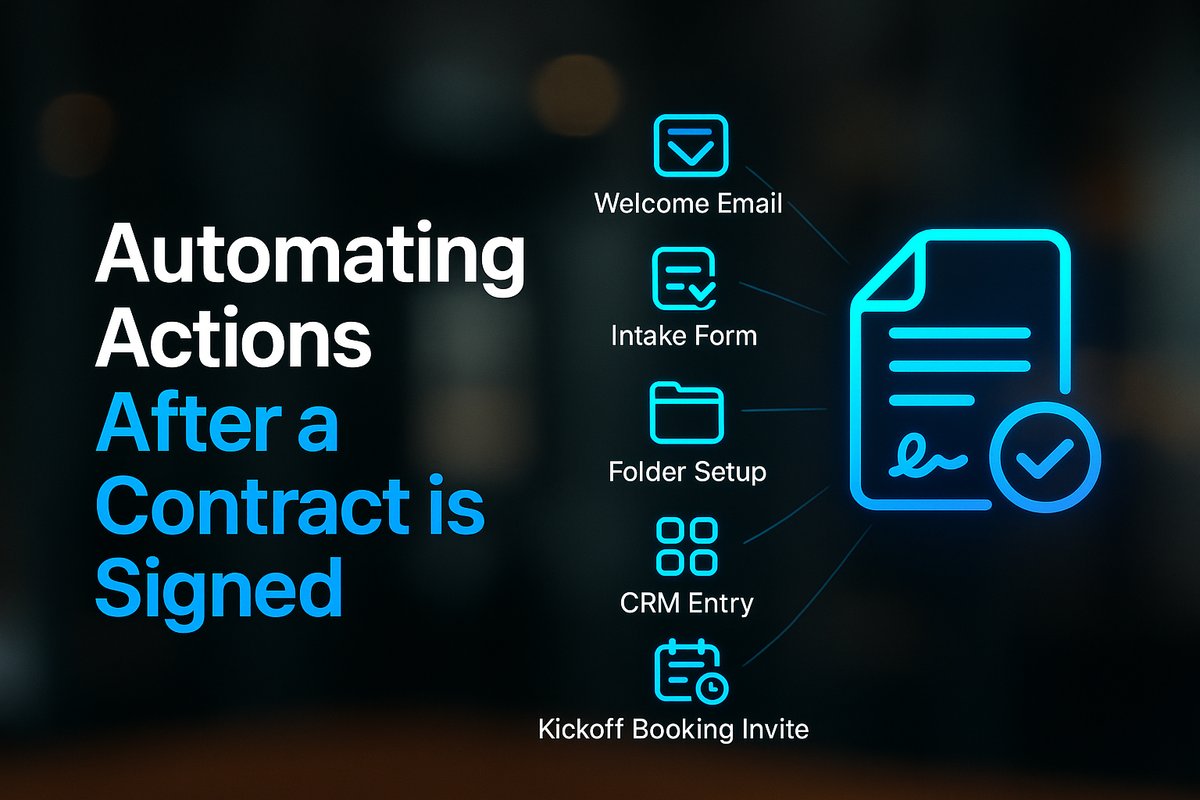
Your automation should always trigger only after the contract is fully executed—not just when it’s sent out. Common triggers are e-signature platforms like DocuSign or PandaDoc, or CRM deal-stage changes. Once triggered, the workflow automates the rollout: welcome email, intake form, and critical provisioning (folders, accounts, CRM records, project tools). Internal assignments are spun up in parallel to avoid bottlenecks.
Automated Steps: From Welcome to Kickoff Scheduling
The core steps for automated client onboarding are predictable, but each business can tailor them. Right after contract signature, the client gets a timed welcome email and intake form, followed by secure workspace or folder creation (e.g., Google Drive). Contacts are added to the CRM, provisioning is run for project tools, and internal to-dos are assigned. For scheduling, tools like Calendly or HubSpot Meetings can send the client a booking link for their kickoff call right away. All of this can happen in parallel, and in under an hour for most small teams.
A small design studio used to take two hours per client preparing for onboarding. Their new workflow automates it in 12 minutes—with no active manual steps after the contract is signed.
Best Practices for Building Reliable Automations
Great automations start with mapping your existing onboarding process: trace the last few client journeys end to end. Look for bottlenecks, repeated re-keying, and handoff delays. Design your automation to parallelize steps where possible, so one slow approval doesn’t block the rest. Assign task deadlines in your project system (Asana, ClickUp, Jira) up front, giving clear accountability for human review or action.
Automate only what makes sense; the kickoff call itself and crucial coaching points need a personal touch. Automated error monitoring—like a dashboard showing where clients are in the workflow—helps you spot and fix issues before they become client frustrations.
Tools and Integrations That Enable Fast Onboarding
Most automations rely on three core categories of tools: e-signature software for trigger (like DocuSign), workflow orchestration platforms (Make.com, n8n, Zapier), and core business systems for downstream steps (Google Drive, ClickUp, Asana, CRM, invoicing, and scheduling tools). The right stack depends on your current setup, but the principles remain the same.
You’ll want to keep a close eye on tool reliability and make sure your workflow has easy exits for manual intervention when edge cases pop up. For insight into where AI can power up these integrations further, see our guide on How to Integrate AI Into Your Workflows.
Monitoring and Improving Your Automated Onboarding
After automation is live, monitoring for silent failures is key. Build or use dashboards that track every in-progress client, flagging anyone stuck waiting on a step or form. Always review the first few real-world uses of your flow and get feedback to improve the experience. For a broader look at what automation can do for your operations, visit Business Process Automation Guides.
Conclusion
Automating client onboarding turns a painful, manual gauntlet into a fast, reliable, and professional step for every client—without losing the human touch at kickoff. Whether you’re looking to save operations time, improve client perception, or simply root out data-entry errors, a well-mapped onboarding workflow will deliver instant wins.
If you’re ready to diagnose and automate your own onboarding, or want to see real examples from businesses like yours, start with our Automation ROI Calculator or Book a Call with a TitanTech360 expert.
Frequently Asked Questions
What steps can be safely automated in onboarding?
Most administrative tasks after contract signature—sending emails, forms, setting up folders, provisioning accounts, and internal task assignments—can be automated safely. Human interaction is reserved for the kickoff call and when decisions are needed.
Which systems need to be integrated for onboarding automation?
At minimum, you’ll want your contract platform (e-signature or CRM), project management system, file storage, scheduling tool, and core communication channels hooked into your automation. Choose orchestration tools that work with your current stack.
How do you handle errors or exceptions in the workflow?
Design your onboarding automation with clear monitoring. Use dashboards or notifications to catch delays or missed steps, and ensure there’s always a manual exit for special cases.
Does automating onboarding eliminate the personal touch?
No. Automation removes manual admin but keeps human interaction—like the kickoff call—where it actually matters for building relationships and tailoring your service.
How fast can onboarding happen with automation?
Agencies using automation have reduced onboarding from 2–9 days to between 15 minutes and 36 hours, with some workflows ready for kickoff in under 30 seconds.
Ready to Put This Into Practice?
Let's talk about where your business stands today and what to fix first.
Book a Call