Key Takeaways
- AI agents streamline repetitive tasks for small businesses, delivering quick wins.
- Practical use cases include lead qualification, customer support, and inbox triage.
- Agents work best when integrated with existing business systems.
- A human-in-the-loop approach improves reliability in early adoption.
- Smart adoption of AI agents frees up staff for higher-value work.
Introduction
Which AI agent use cases actually save time, cut interruptions, and deliver real value for a small business? The most practical options are those that handle repetitive, well-defined tasks—without creating new work for you. AI agents can qualify leads, respond to routine inquiries, triage email, capture data, and more, all by connecting with your existing systems. With smart rollout and clear handoff rules, these agents free up your team for higher-value work while ensuring key details never fall through the cracks.
1. Lead Qualification and Routing
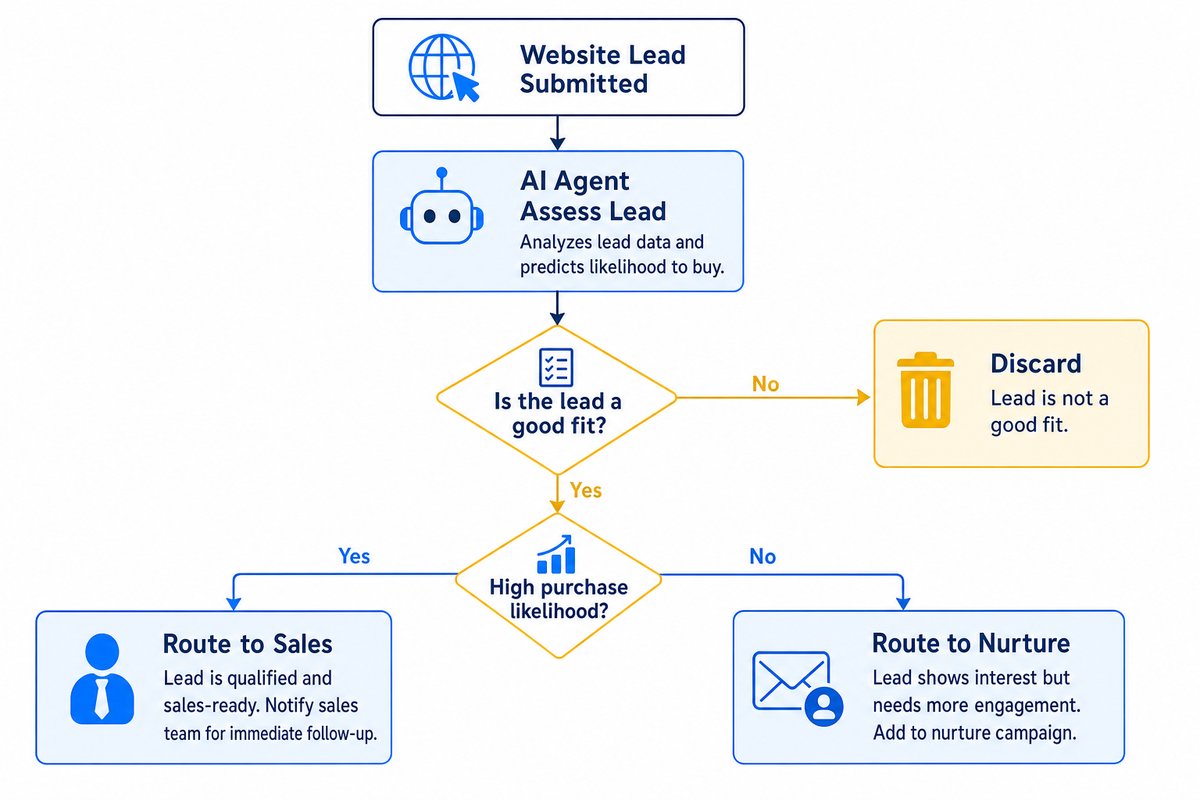
AI agents can quickly evaluate new inquiries from your website, lead forms, or emails, scoring the fit based on your criteria—then flagging hot leads for follow-up or auto-routing them to the right sales rep. Many businesses use agents to capture contact details in the CRM, send a pre-qualifying email, or schedule calls with strong-fit prospects. This offloads repetitive filtering from your sales team and speeds up response times.
Want help implementing this in your business?
Book a Call2. Customer Support: FAQ and Order Status Replies
Customer service agents shine on repetitive questions: order tracking, appointment rescheduling, basic support queries, or policy lookups. They can handle first-line responses or draft replies for a human to review, with handoff on anything unclear. This speeds up response for frequent queries, while maintaining quality by escalating the exceptions.
If you want to see how this fits into broader business systems, our article on The 7 Systems Every Business Needs to Grow covers where support automations slot into the bigger picture.
3. Inbox and Email Triage
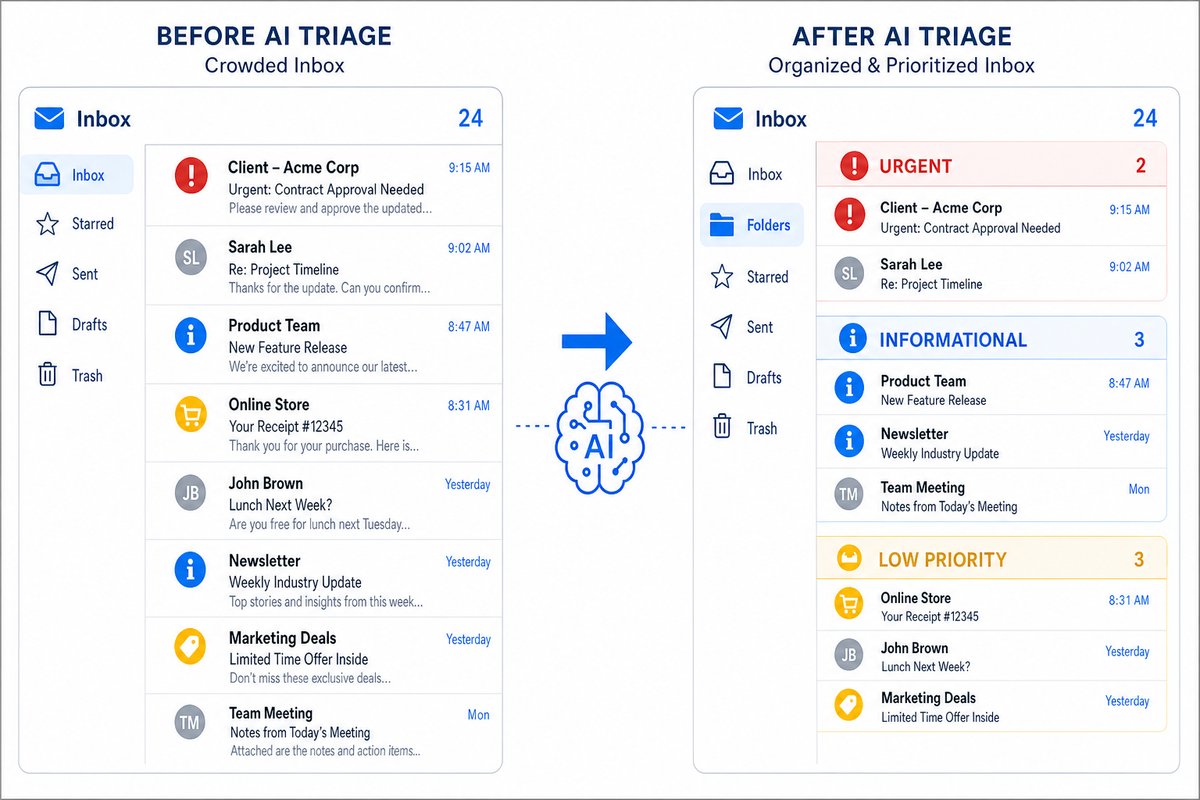
An AI agent can review your shared inbox, categorize messages, prioritize important threads (like sales inquiries or customer escalations), and even draft common replies. This sort of triage means less time spent filtering out noise or forwarding emails internally. Early on, many teams set agents to work in 'draft' mode before building confidence for auto-send actions.
4. CRM Data Entry and Reporting
AI agents handle repetitive data entry between tools, such as logging calls or email conversations into your CRM, syncing contact records, or extracting notes from meeting summaries. Agents can also generate daily or weekly reports: for instance, summarizing new leads, support resolutions, or quoting activity, providing managers with at-a-glance insights. This keeps your client data clean and helps leaders spot trends sooner.
5. Document Intake and Invoice Extraction
Agents process incoming documents—such as supplier invoices or customer contracts—by extracting key data and mapping it into your accounting, project, or inventory systems. This removes the bottleneck of manual document review. For tasks like invoice matching or document intake from email, most small businesses start with review-only mode before allowing full automation.
6. Internal Knowledge Assistant
AI agents can answer team questions or find the right document in internal knowledge bases, saving time typically lost to searching shared drives or pinging colleagues. They can draft onboarding messages, point to policies, or summarize standard procedures—an especially powerful help for onboarding new team members or providing instant policy lookups.
You’ll find more detailed workflow examples in our AI Integration Guides for Small Business resource hub.
7. Inventory and Operations Monitoring
Some agents monitor inventory levels, daily transactions, or operational alerts by connecting to your existing systems. When something crosses a threshold—like low stock or an unfilled order—they flag it or trigger standard responses. This use case keeps owners and managers one step ahead while reducing oversights.
Conclusion
The most practical AI agent use cases for small business are clear, repetitive tasks that connect naturally with your current tools and workflows. These agents speed up lead handling, customer support, inbox triage, data entry, and other routine responsibilities—giving your team back time and delivering more consistent outcomes. The key: start practical and scale up as your team’s trust and comfort grow.
To see if your operations are AI-ready or to plan your next step, check out Which Business Processes Are AI-Ready Now?.
Frequently Asked Questions
Are AI agents expensive for small businesses to implement?
Costs vary. AI features built into tools you may already use, such as help desks, CRMs and inbox tools, are often included in your plan or sold as an add-on, which keeps the starting cost low. Custom agents take more setup, so map the process and estimate the time it will save before you invest.
How do I keep AI agents from making mistakes with important customer conversations?
Use a 'draft' or human-in-the-loop mode for replies at first. Only move to automated sending after reviewing accuracy over time. Start with low-risk interactions and build up based on trust and results.
Which business process should I automate with AI agents first?
Start with a process that’s repetitive, well-defined, and easy to check (like lead qualification or inbox triage). Our post on Which Business Processes Should You Automate First? outlines a simple selection guide.
How do AI agents connect to existing business tools?
Most agents connect through the built-in integrations of your email, CRM, project management or accounting tools. You decide what data each agent can see and what it is allowed to do, so review those permissions before you switch anything to run automatically.
Ready to Put This Into Practice?
Let's talk about where your business stands today and what to fix first.
Book a Call